Supplement sections
Group supplements by time of day and see them on one Home checklist with habits and workouts.
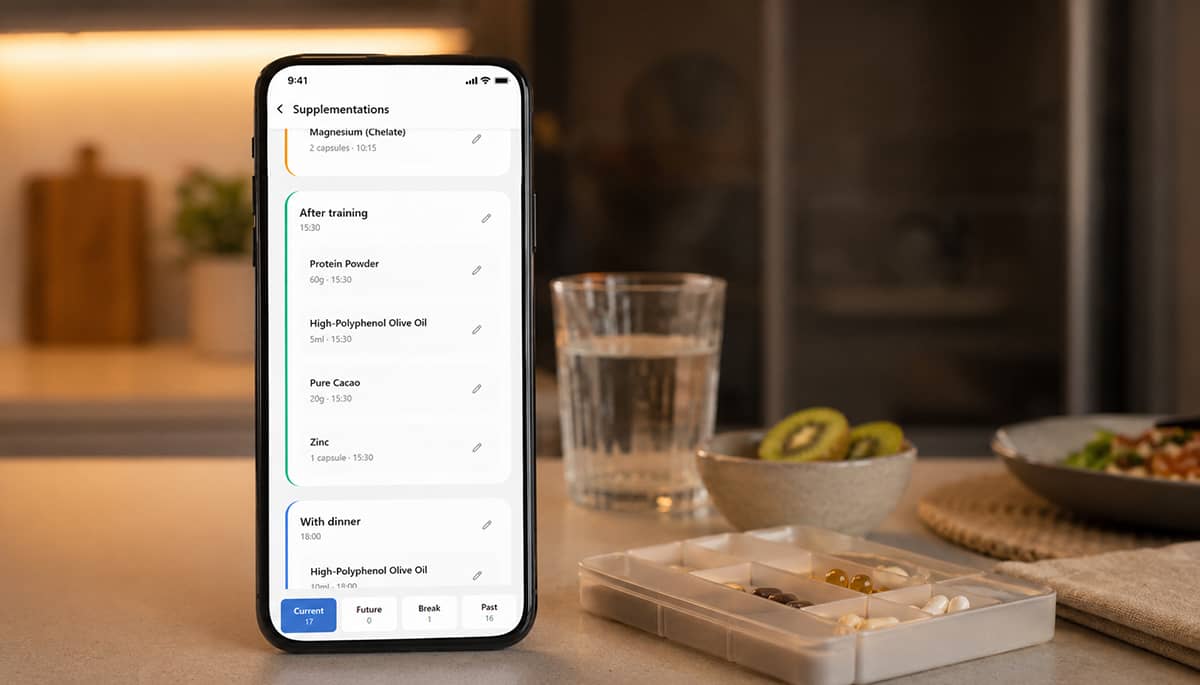
Table of contents
Why time-of-day grouping matters
A supplement stack is rarely “one moment in the day.” Some products fit breakfast, others post-workout, others before sleep—and many people run different schedule types at once (continuous foundations, short courses, cyclical breaks). When each product lives in a separate mental slot, it is easy to remember the list in the morning and lose half of it by evening.
Grouping by time of day turns a loose pile of capsules into a small number of moments you can actually execute. You are not deciding twelve times; you are showing up at breakfast, after training, or before bed—and taking what belongs there.
Longevity Protocols supports that model with supplement sections (named groups with a time) and a Home checklist that lines those groups up alongside habits, workouts, and other protocol actions for the selected day.
What supplement sections do
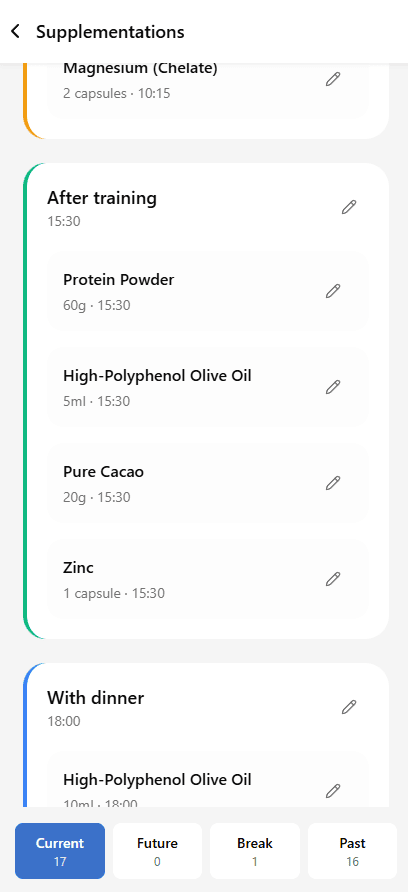
Supplement sections let you organize active supplements into named groups—for example With breakfast, With dinner, or Before bed—each with an optional time of day. Supplements assigned to a section appear together on the Supplementation screen and, when active, on Home as a single checklist item for that moment.
The feature combines three elements:
- Structure: sections have a name, time, and order; supplements are assigned in the supplement form.
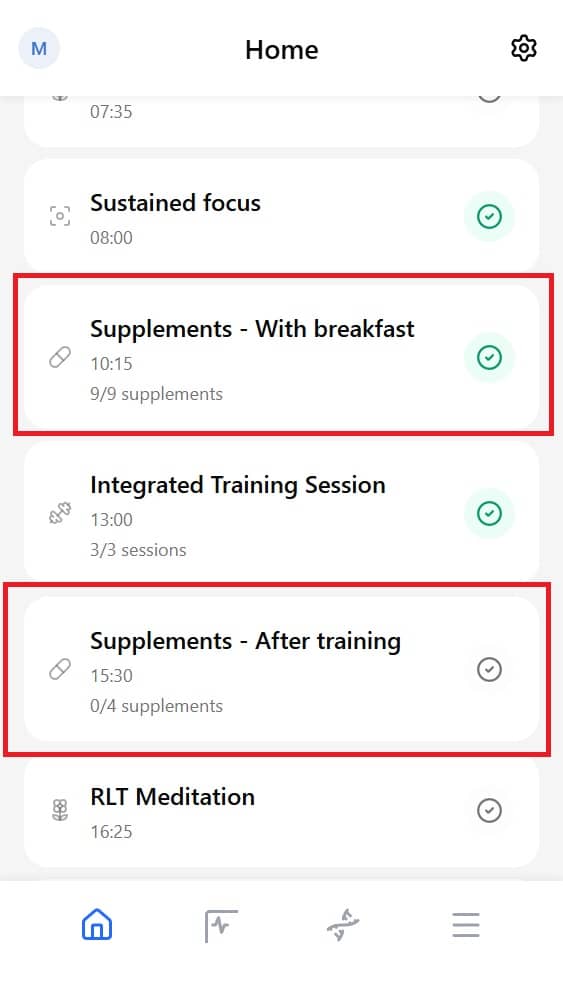
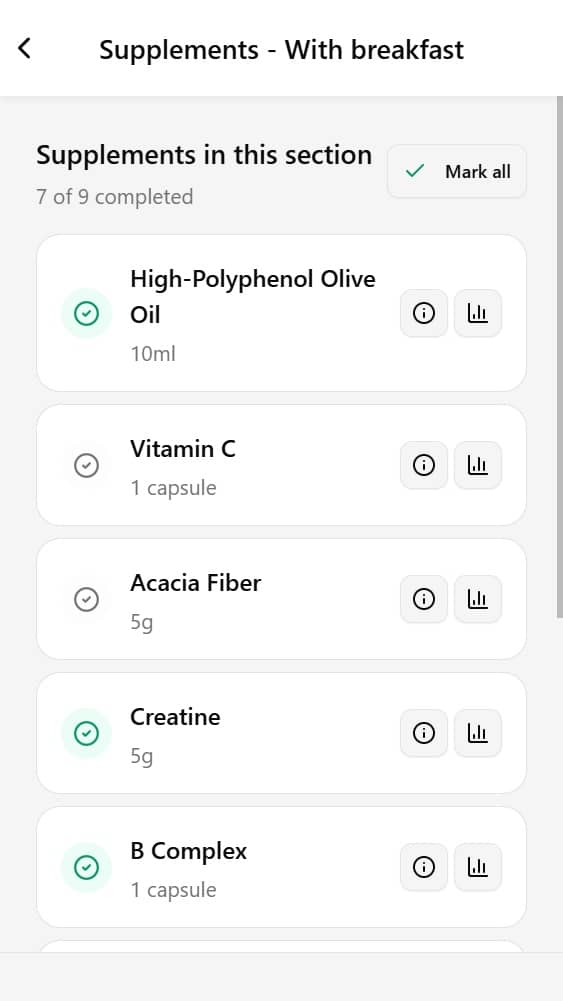
- Daily execution: on Home, a section appears as one row (for example “Supplements - With breakfast”) with a progress count.
- Unified day view: supplements share the Home checklist with scheduled habits and workouts, sorted by time where possible.
Use supplement sections when you take several products at the same moment, when timing matters for absorption or routine, or when you want Home to reflect when you supplement—not only what is in your stack.
Problems that supplement sections help solve
Do you ever fall off your supplement routine because every product has a different time of day?
Many stacks fail not from lack of knowledge but from fragmented timing. One capsule with breakfast, two after lunch, magnesium at night, vitamin D “whenever”—by afternoon the plan feels like twelve separate tasks. Spreadsheets and pill organizers help storage, but they rarely give you one daily flow next to your other health actions.
Supplement sections help address this timing gap. They batch products into clear moments and surface those moments on the same Home screen where you already complete habits and training.
This is especially useful when the need is not “What should I take?” but “How do I run my stack without dropping pieces through the day?” Supplement sections can help by:
- Grouping by moment: put everything for breakfast, dinner, or bedtime in one section instead of scattered entries.
- Assigning a time: each section can have a clock time so it sorts with other Scheduled items on Home.
- One-tap section completion: mark an entire section done from Home when you have taken everything in that group.
- One checklist for the day: supplements appear alongside habits and workouts—so longevity actions live in one place, not three apps and a note.
Use supplement sections when your stack has more than one intake moment, or when you want Home to mirror how you actually take supplements in real life.
How supplement sections work
The flow from setup to daily use:
- Create sections on the Supplementation screen (name + time of day).
- Assign supplements to a section when adding or editing each product.
- Review grouped supplements under the Current filter on Supplementation.
- Complete from Home: section rows appear under Scheduled (if the section has a time) or Anytime.
- Drill down by tapping a section to see individual products and mark them one by one—or use Mark all.
Sections only include supplements that are current today (respecting temporary and cyclical schedules). Products without a section still appear on Home as individual supplement rows.
How to open supplement sections
You manage sections from Supplementation:
- Tap the Protocol tab in the bottom navigation.
- Open the Supplementation tile from the protocol grid.
- On the Current tab, view supplements grouped by section.
To create or edit sections:
- Tap Add section (or edit an existing section from the section header controls).
- Enter a section name and time of day, then save.
New accounts: the app may seed sample sections With breakfast and With dinner so you can start quickly—you can rename, retime, or remove them.
Create sections and assign supplements
Create or edit a section
- On Supplementation, tap Add section.
- Set the name (for example “Before bed” or “Post-workout”).
- Set the time used for sorting on Home (for example 08:00 or 22:00).
- Save. Drag or use section ordering as shown in the app to keep your preferred sequence.
Assign a supplement to a section
- Tap Add supplement (library) or open an existing supplement to edit.
- In the supplement form, choose a Section from the list (or None for standalone timing).
- Save.
Supplements in the same section are taken together at that moment. Standalone supplements (no section) can still use their own time of day and appear as separate rows on Home.
Tip: Match section names to real-life anchors (meals, training, sleep) so the mental model stays simple when you are tired or traveling.
Complete supplements from Home
Open the Home tab to see today’s checklist for the selected date.
Where sections appear
- If the section has a time, it appears under Scheduled, sorted with other timed actions (habits, workouts, integrated sessions).
- If there is no time, the section appears under Anytime.
Each supplement section row shows:
- title in the form Supplements - [section name],
- the section time (when set),
- progress such as 2/4 supplements.
Mark done
- From Home: tap the checkbox on the section row to mark all supplements in that section as taken for today (when all are not yet logged).
- From details: tap the row to open the section checklist; toggle individual supplements or tap Mark all.
Supplements also contribute to your daily progress on Home together with habits and other actions—so completing morning supplements is part of the same day you are already tracking.
Rules and FAQ
Do I have to use sections?
No. Supplements without a section appear as individual items on Home. Sections are optional but recommended when you take several products at the same time.
What is the difference between section time and supplement time?
The section time drives sorting and the Home Scheduled group for the whole batch. Individual supplements in a section inherit that grouping; standalone supplements use their own time field.
Can one supplement be in two sections?
No. Each supplement is assigned to at most one section (or none).
Why do I not see a supplement on Home today?
It may be future, on break (cyclical), past (ended temporary course), or inactive. Check the Current / Break / Future filters on Supplementation.
Can I complete only some supplements in a section?
Yes. Open the section from Home and check off individual products. The section row on Home shows partial progress (for example 1/3) until all are marked.
Does this replace supplement schedules (continuous / temporary / cyclical)?
No. Sections answer when in the day; schedule types answer for how long. Use both together for a full protocol.